PTX3000 SINGLE-DECK PROTRACKER .MOD DJ INSTRUMENT
A record deck for ProTracker modules: a faithful module replayer — the classic effects, the LED filter, band-limited synthesis — with a vinyl-style control surface on top. Pitch fader, cue points, loops, slip mode, and two analog-stick FX slots. This page is the manual, plus links to every build. If .MOD files are new to you: four-channel tracker music, tiny files, and hundreds of thousands of them out there to play.
Add it to your home screen
PTX3000 is a PWA — when pinned to a phone or tablet it opens fullscreen with no browser chrome, in the handheld layout with the touch deck.
iPhone / iPad (Safari): open this page → tap Share → Add to Home Screen → Add. The PTX3000 tile appears next to your apps. On iOS this is strongly recommended — the home-screen app runs far smoother than a Safari tab, so add it before you spin.
Android / Chrome / Edge: browser menu ⋮ → Add to Home screen (or Install app).
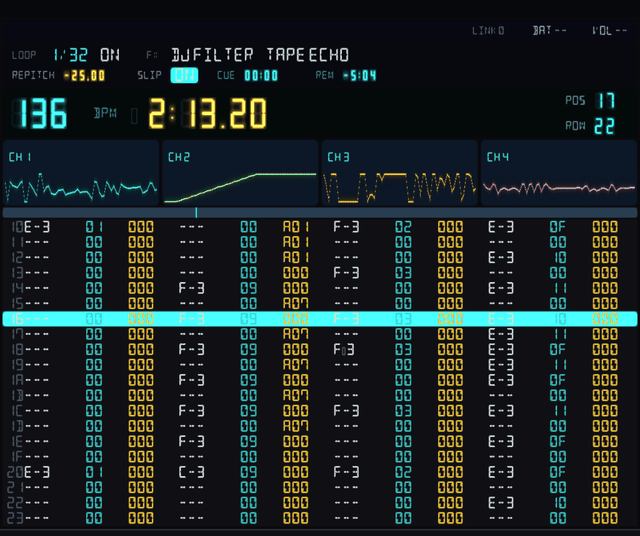
The panel above is redrawn in CSS for this page; the real one looks the same. Press run to open it.
The deck
Any standard gamepad works; phones get the on-screen touch deck, and there's a full keyboard map below. Hold Select for the SHIFT layer, or double-tap it to latch SHIFT on.
Base layer
| A | Play / stop |
| B | Cue recall — snap back to the stored cue |
| X | Loop toggle |
| ◀▶ | Nudge (momentary, like riding the platter) |
| ▲▼ | Loop length — 2 / 4 / 8 / 16 / 32 / 64 rows (64 = PATT.LOOP) |
| L1R1 | Pitch −1% / +1% (coarse; holds auto-repeat) |
| L2 | Cue store |
| R2 | Reset pitch to 0% |
| L-STICK | FX slot 1 (default: DJ Filter) |
| R-STICK | FX slot 2 (default: Tape Stop) |
| SELECT | SHIFT — hold, or double-tap to latch |
| MENU | Open / close the overlay |
Shift layer
| YXBA | Mute channel 1 / 2 / 3 / 4 directly |
| ◀▶ | Move the loop region ± one length |
| ▲ | Slip mode on / off |
| ▼ | Loop roll (momentary) |
| L1R1 | Fine pitch −0.1% / +0.1% |
| L2 | Cue delete — clear the stored cue (base L2 stores it) |
| L-STICKR-STICK | Push ↑/↓ to scroll that stick's FX — SHIFT must be held, not latched |
The keyboard
Every control has a key. The deck (overlay closed) and the menu (overlay open) use different keys — both are listed here. Hold Shift for the SHIFT layer.
Deck — transport & pitch
| Space | Play / stop |
| ← → | Nudge (momentary) |
| Shift+←→ | Hard nudge (a firm shove) |
| ↑ ↓ | Pitch up / down |
| Shift+↑↓ | Fine pitch ±0.1% |
| Del | Reset pitch to 0% |
| − = | Seek back / forward one pattern |
| ` | Kill sound (panic) |
| Tab | Repitch (keylock) on / off |
| F11 | Fullscreen on / off |
| M | Open the menu (this browser build — desktop uses Esc / F12, which browsers reserve) |
Deck — cue
| X | Trigger cue — jump to the stored cue |
| S | Store cue — set it at the current spot |
| C | Delete cue — clear it back to the start |
Deck — loop & channels
| L | Loop on / off |
| [ ] | Loop length − / + (2…64 rows) |
| Shift+−= | Move the loop region ± one length |
| R | Loop roll (hold) |
| Q | Quantize loops to the beat |
| V | Slip mode on / off |
| 1–4 | Mute channel 1–4 |
| Shift+1–4 | Solo channel 1–4 |
| 5 | Unmute all |
The menu
| ↑ ↓ | Move the selection |
| ← → | Change a setting / page the list ±20 |
| [ ] | Previous / next tab (or Left / Right Shift) |
| Space | Select / load |
| M Esc | Close the menu (desktop: Esc / F12 / Tab) |
| P | Local — file the track into a playlist or crate |
| X / P | Downloader — search / preview |
| X / P | Lists — row menu / remove from the list |
What the lights mean
The overlay
Press Menu (pad), or M in this browser build — Esc / F12 on the desktop builds; the shoulders — or [ ] — cycle the five tabs. B, M or Esc backs out.
Your library
Browse and load your .mod files: ↑/↓ selects, A loads, Y (keyboard P) files the highlighted track into a playlist or crate. In the browser build the LIB button (top-left) opens the library — LOAD FILE adds a module from your device, and your browser remembers it locally between visits.
Sets and crates
A playlist is an ordered set list; a crate is a name-sorted bucket, and a track can sit in as many as you like. Press Y (keyboard P) on a track in LOCAL to file it, A to open a list and load from it, X on any row to rename, reorder, copy, move or delete. A * marks anything you have played for more than 25 seconds this session.
Crate-digging
Every build — this browser one included — browses modland's ProTracker collection in-app: search titles and artists with the on-screen keyboard, A downloads to your library, Y auditions on the deck first. You can still LOAD FILE anything you already have, from The Mod Archive, modland or your own crates.
The trim pots
LED filter on/off, default pitch, pitch-fader range (±8 to ±100%), and which effect each stick drives.
The cheat sheet
This manual's control tables, on the device itself — handy on a handheld, away from this page.
Stick FX
Each analog stick is one FX slot. Distance from centre is the dry/wet mix; the X and Y axes are two macro parameters — cutoff and resonance, delay time and feedback, whatever the effect exposes. Release the stick and the effect drops out. Defaults: left stick DJ Filter, right stick Tape Stop; swap either in Settings.
Swap them mid-set without opening a menu: hold Select and push a stick up or down to step through the list — hold it there and it scrolls, faster the further you push. Both sticks stop playing FX while you browse, and the new effect is live the instant you release Select.
Every platform
Every build has the same deck, replayer and modland downloader. The native builds add MIDI in and user-editable key/pad mapping.
Run it now — or pin it to your home screen for the fullscreen handheld layout. Touch deck on phones, gamepad and keyboard everywhere.
Unzip, run PTX3000.bat. SDL2 is bundled; gamepads are picked up automatically.
Unzip and run. Builds for desktop glibc distros and 64-bit ARM (incl. Raspberry Pi OS Trixie or later); ships a script to unlock realtime audio priority.
Unzip, run. On first launch: right-click → Open (the build is unsigned).
Drop the port into your PortMaster autoinstall directory and run PortMaster — works on PanicOS, ROCKNIX, Knulli, and MuOS handhelds.
Self-contained AppImage — SteamOS's immutable rootfs only installs Flatpak or AppImage. Mark it executable, or add as a non-Steam game.
Ships on the Stop The Panic Pro handheld, next to PanicTracker Pro. See below.
Every button above pulls the newest build straight from GitHub. Want an older version, checksums or the full list? Browse all releases →
From the same bench:
PanicTracker
PTX3000 comes from the same workshop as PanicTracker, our full tracker. If you'd like to write modules as well as play them, that's the one.
Both also run on the Stop The Panic Pro handheld, which ships with a PanicTracker Pro license and PTX3000 preinstalled.